You press the button, nothing comes out, and the screen shows "Check Atomizer" or "No Atomizer". No panic: this is one of the most common error messages in vaping, and nine times out of ten it is sorted in five minutes, with no repair service and no new hardware. In practice, your mod or your pod is telling you one thing only: it is not detecting the coil properly. Here are all the possible causes, from the most frequent to the rarest, and how to fix them.
What do "check atomizer" and "no atomizer" mean?
The atomiser ("atomizer" in the American spelling used on screens) is the part of your e-cigarette that heats the e-liquid: the clearomiser or the cartridge, and above all the coil inside it. On every puff, the chipset in your mod measures the value of that coil in ohms. If it measures nothing - or a nonsensical value - it cuts everything as a safety measure and shows the error.
Depending on the brand, the same problem is displayed differently:
| Message displayed |
Brands concerned |
Meaning |
| Check Atomizer |
Vaporesso, Innokin, Aspire |
Coil not detected, or abnormal value |
| No Atomizer |
GeekVape, Voopoo, Lost Vape |
No coil detected at all |
| Atomizer Short |
All |
Short circuit detected |
| Atomizer Low |
All |
Coil value too low for the mode in use |
Good news: this message is a protection, not a breakdown. The mod is simply refusing to fire until it is sure what it is powering - which is what stops your gear (or worse) getting fried.
Cause no.1: the coil is not screwed in or pushed in properly
By far the most common cause. A coil that is not tight enough does not touch the contact pin; too tight, and it can crush it. On a pod, a cartridge that has not clicked into place produces exactly the same symptom.
The fix: unscrew your clearomiser, take the coil out, then put it all back together, tightening firmly but without forcing. On a pod, take the cartridge out, check that the coil is pushed in straight and all the way down, then click it back in.
Cause no.2: the contacts are dirty or wet
E-liquid builds up over time in the threading (the 510 connection) or on the gold-plated pin at the bottom of the mod. That greasy film insulates the contacts, so the mod can no longer "see" the coil.
The fix: wipe the pin on the mod, the thread of the clearomiser and the underside of the coil with a lint-free cloth or a cotton bud lightly soaked in isopropyl alcohol. Leave it to dry for 2 minutes and reassemble.
Cause no.3: the coil is dead or faulty
A burnt out, flooded or simply factory-faulty coil (it happens, even with the big brands) may not be detected at all. If the error appeared right after a coil change, you have probably found the culprit.
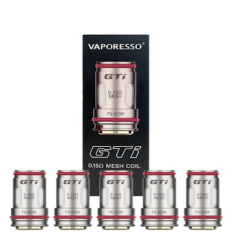
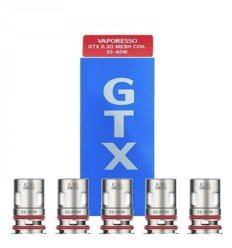
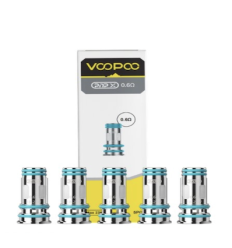
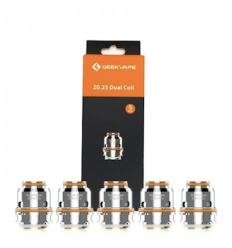
The fix: fit a new coil. Always keep a spare pack in - our best-sellers cover the most widespread platforms:
Cause no.4: a short circuit ("atomizer short")
If the message is "atomizer short", the mod is detecting a short circuit: a coil touching the chimney on a rebuildable, a crushed coil, a 510 pin pushed in too deep, or liquid that has run into the connection.
The fix: strip it down, dry it, inspect it. On a rebuildable, check that the coil is touching neither the top cap nor the chimney and that the deck screws are tight. If the error persists with a new coil and clean contacts, try the clearomiser on another mod to work out which part is at fault.
Cause no.5: coil value out of range ("atomizer low")
Every mod has a supported resistance range (0.1 to 3 ohms, for example). A coil below the minimum - common when you move from an MTL setup to an exotic sub-ohm one - triggers "atomizer low".
The fix: check the supported range in your mod's manual and the value engraved on the coil. If you are in curve or variable wattage mode, switch back to plain wattage mode, which is more forgiving.
Cause no.6: the 510 pin or the chipset
Rare, but real: the spring-loaded centre pin on the mod can stay stuck in the down position, especially if a clearomiser has been screwed on too hard. And on older or dropped hardware, the chipset itself can be at fault.
The fix: with the mod switched off, gently work the gold centre pin with a cocktail stick (never anything metal) to check that it springs back out. If it stays stuck, or if the error comes up with every clearomiser and every coil, it is time for a replacement - have a look at our puffs to keep you going in the meantime, or at our complete kits to start again on new hardware with a warranty.
Diagnosis in 5 steps
- Screw it back on - coil and clearomiser, firm but without forcing
- Clean - the pin on the mod, the 510 connection, the underside of the coil
- Replace the coil - with a new one, compatible and primed
- Swap the hardware around - your clearomiser on another mod (or the other way round) to isolate the culprit
- Check the 510 pin - if it is stuck, free it gently
Prevention: always prime a new coil (a few drops of liquid on the cotton, then 10 minutes soaking with the tank full), wipe the 510 connection after any messy refill, and carry your gear upright rather than lying at the bottom of a bag.
FAQ
I get the message right after changing my coil - why?
That is the most common case: the new coil is not pushed in properly, not screwed in properly, or - more rarely - faulty from the factory. Take it apart, refit it straight, tighten it correctly. If the error persists, try another coil from the same pack.
My brand-new pod shows "no atomizer" straight out of the box
Check that a protective plastic film is not covering the contacts on the cartridge (common on new pods), then take the cartridge out and click it back in. If nothing helps, get in touch: it is covered by the warranty.
"Check atomizer" on my Vaporesso: is this a known problem?
No - Vaporesso simply shows "check atomizer" where GeekVape or Voopoo show "no atomizer". The causes and the fixes are identical; start by screwing things back on and cleaning the contacts of your XROS, GTX or Luxe.
The error comes and goes, only when I press hard
A classic sign of a bad contact: a tired 510 pin, a coil that has worked slightly loose, or a clogged thread. Clean and screw it back on; if the error always comes back when you shake the device, the pin is the problem.
Could it come from the e-liquid?
Indirectly, yes: a very sweet liquid clogs the contacts faster, and a clumsy refill can let liquid run into the 510 connection. Which is exactly why a regular wipe is worth it.
Nothing works - is the mod dead?
If the error comes up with several clearomisers AND several coils, with clean contacts and a free pin, the chipset is probably at fault. On recent hardware, claim on the warranty; otherwise, it is a good moment to move to a current kit.
In summary
"Check atomizer" and "no atomizer" flag the same problem: the mod is not detecting the coil. Screw it back on, clean it, replace the coil - in that order - and you will have solved the vast majority of cases. Always keep a spare pack of coils in: it is the wear part of your setup, and it is almost always the guilty one.
Find all our
coils by brand and by platform - shipped from our French warehouse, with you in 48 hours.

 Figue de Septembre
 Tiramisu Coco Maison Unicorn
 Acapulco Canicule
 Tropézienne d'Août
 Cookie Pécan Maison Unicorn
 500! Mango Passion Guava
 Angel Hair Maison Unicorn
 Baklava Pistache BKLV
 Melba de Juillet
 Lemon Madeleines
 UNICORN
 T-JUICE
 CEBUENO
 JNR
JNR
 ELFLIQ
![[.UNICORN_AI]](http://unicornvape.com/modules/pm_advancedtopmenu/element_icons/3-en.png "[.UNICORN_AI]") [.UNICORN_AI]
[.UNICORN_AI]
 10 ANS UNICORN
 500!
500!
 BKLV
BKLV
 CANICULE
 EXPERIENCES
 FLASK E-LIQUIDS
 JUS.
JUS.
 LE GROS JUS
 LE P'TIT JUS
 MAISON UNICORN
 PEGAZ
PEGAZ
 THIS IS BREAKFAST !
 UNICORN 2026
 UNICORN BLENDS
 UNICORN SIGNATURE 100
 UNICORN SIGNATURE 200
 YAOURT
 CALIFORNIA VAPING
 CLOUDS OF ICARUS
 CUTTWOOD
 FIVE PAWNS
 HOLY COW
 MONSTER LABS
 PYE ELIQUIDS
 10 ANS UNICORN
 LE GROS JUS
 BIG JUICE
 UNICORN 10ML
 500!
500!
 BAKERY SHAKE
 BOO
BOO
 CANDY SHAKE
 CANICULE
 CATVENGERS
 CEVAPE
 CHILL FOR SUMMER
 FLASK E-LIQUIDS
 FRUITY COOL
 GATES OF VAPE
 GLAZE
GLAZE
 GOOD VIBES
 HARAKIRI
 JUICY SHAKE
 KEMET LEGACY
 KING
KING
 KULT & ZEST
 LES INDISPENSABLES
 LIFE IS SWEET
 MAISON VELOURS
 NAMMOS
 NINJA
NINJA
 OHM DES BOIS
 ORIGINAL SUMMER
 RED MAN
 REMIX
REMIX
 ROCK N ROLL
 SALAK
SALAK
 SWEET SHAKE
 TASTY REX
 TEA TIME
 WARRIOR
 YUMMY
YUMMY
 THIS IS BREAKFAST !
 YAOURT
 AIRMUST
 BELGI'OHM
 BIG FUEL
 BIGGY BEAR
 BKLV
BKLV
 HELLO CLOUDY
 JIN AND JUICE
 JOE'S JUICE
 MAISON UNICORN
 MONSTER
 MONSTER PUFF
 PÜD BY JOE'S JUICE
 SHOOTIZ
 SPACE FRUIT
 UNICORN 10ML
 UNICORN SIGNATURE
 UNICREAMS
 VIRGULE
 WHIPPED
![[.UNICORN_AI]](http://unicornvape.com/modules/pm_advancedtopmenu/element_icons/126-en.png "[.UNICORN_AI]") [.UNICORN_AI]
[.UNICORN_AI]
 AMERICAN DREAM
 ANARCHIST JUICES
 ARCADE
 ARÔMES ET SECRETS
 ARTEFACT
 ASSASSIN JUICE
 BABY BEAR
 BANGER'Z
 BELGI'OHM
 BOMBO
BOMBO
 CABOCHARD
 CALIFORNIA VAPING
 CALL OF VAPE
 CEBUENO
 CE'GOOD
 CHAT PERCHÉ
 CHUFFED
 CLOUD EMPIRE
 CLOUDS OF ICARUS
 CLOUD VAPOR
 COSMIC FOG
 CURIEUX
 CUTTWOOD
 DINOS
DINOS
 DONUT KING
 DOOZY VAPE
 DOTMOD JUICE
 DOUGH KING
 DR FROST
 F*CKING JUICES
 FCUKIN FLAVA
 FIVE PAWNS
 FIXION
 FIZZY JUICE
 GUILAB
 HALL OF FAME
 HOLY COW
 HORNY FLAVA
 JUICE 66
 JUICE MAN
 JUS.
JUS.
 JUST BUENO
 JUST JAM
 JUST JUICE
 KAWAII
 KURO
KURO
 KYANDI SHOP
 L'INVAPABLE
 LOS 5 MUERTOS
 MADE IN VAPE
 MAISON FUEL
 MAWIX
MAWIX
 MEXICAN CARTEL
 MILKY SHAKE
 MONSTER LABS
 MOREISH
 MORTAL JUICE
 MOVIE JUICE
 O'J LAB
 OMERTA LIQUIDS
 PABLO'S CAKE SHOP
 PAPERLAND
 PEGAZ
PEGAZ
 PROHIBITION POTIONS
 RELIGION JUICE
 SADBOY
 SHONEN VAPOR
 SOLANA
 SPACE ODYSSEY
 SULTAN CLOUD
 TÉKATÉ
 THE DAILY GRIND
 THE FRENCH BAKERY
 THE MDS JUICE
 TRIBAL FORCE
 TWELVE MONKEYS
 UNICORN BLENDS
 UNICORN SIGNATURE
 VAMPIRE VAPE
 VAPE CITY
 VAPE INSTITUT
 VAPEIQ
 VDLV
VDLV
 VERSUS JUICES
 VNS
VNS
 WICK LIQUOR
 WOW CANDY JUICE
 XCALIBUR
 YETI
YETI
 10 ANS UNICORN
 ACE
ACE
 ADALYA
 AL-KIMIYA
 AROMAZON
 ARÔMES ET LIQUIDES
 ARTIST
 AVAP
AVAP
 BAM BAM'S CANNOLI
 BELGI'OHM
 BEN NORTHON
 BEST LIFE
 BIG PAPA
 BOLLYWOOD GUM
 BUCCANEER'S JUICE
 BUNJA
BUNJA
 CEDRIC GROSCAKE
 CHARLIE'S CHALK
 CHAT PERCHÉ
 CHICHA PUFF JUICE
 CHIDO
CHIDO
 CLOUD VAPOR
 COBRA JUICE
 CREEPS VAPOR
 CUPIDE
 CYBER STEAM
 DEVIL SQUIZ
 DICTATOR
 DILLIGAF
 DINNER LADY
 DON CRISTO
 DOTMOD JUICE
 DUNK JUICE FACTORY
 E-CONE
 EKOMS
EKOMS
 ELIQUID FRANCE
 ELYSIAN LABS
 EMPIRE BREW
 ENFER
ENFER
 ESSENTIA
 E.TASTY
 EXPERIENCES
 FAKE N' VAPE
 FIFTY VAPE
 FIVE PAWNS
 FLAKE VAPOR
 FREEZE TEA
 FRENCH KISS
 FRENCH RIVIERA
 FRUITOS
 FRUITY DEALER
 FRUITY SUN
 FRUIZEE
 FULL MOON
 FURIOUS FRUITY
 GLAS VAPOR
 GOO PUFF
 H2O
H2O
 HALO
HALO
 HAPPY HOUR
 HIDDEN POTION
 HYSTER-X
 IGUANA
 IN YOUR FACE
 JIN AND JUICE
 JNR
JNR
 JUICE 66
 KNOKS
KNOKS
 KOMBUCHA FEVER
 KXS LIQUID
 KYOTO STORM
 LA BONNE VAPE
 LA BELLE ÉPOQUE
 LA FABRIQUE FR
 LA MANUFACTURE
 LA TABACCHERIA
 LE COQ QUI VAPE
 LE FRENCH LIQUIDE
 LE MIXOLOGUE
 LE P'TIT JUS
 LE PETIT GOURMET
 LE PETIT VERGER
 LE VAPOTEUR BRETON
 LES 3 MOUSQUET'AIR
 LES 4 VAPTASTY
 LES FRUITS DE LA TENTA JUICES
 LIKE A WOMAN
 LIQUIDAROM
 LIQUIDEO
 MAD HATTER
 MAD MANIACS
 MADE IN VAPE
 MAÎTRE VAPOTIER
 MAOUSSE LAB
 MILLÉSIME
 MONTREAL ORIGINAL
 MOONEYE
 MOONSHINERS
 MR MERINGUE
 MYNTE
MYNTE
 NASTY JUICE
 NEKTAR
 NIRVANA
 NOX
NOX
 O'J LAB
 OLYMP
OLYMP
 PEGASUS
 PEP'S
PEP'S
 PETIT NUAGE
 POPPY'S
 PRESTIGE
 PROTECT
 PROVOCATION
 PULP
PULP
 PUNK FUNK HERO
 PYE ELIQUIDS
 REBORN ANIMAL
 REDNECK
 RED VALENTINE
 RIOT SQUAD
 RIPE VAPES
 ROYKIN
 SAWADEE VAPE
 SECRET LAB
 SENSHI FLAVOR
 SOLANA
 STEEP VAPORS
 SWAG JUICE
 SWOKE
SWOKE
 TATTOO VAPE
 THE FUU
 T-JUICE
 TRIBAL FORCE
 TWELVE MONKEYS
 UNICORN 2026
 VAMPIRE VAPE
 VAPE INSTITUT
 VAPE MAKER
 VAPE SAUCE
 VAP'LAND JUICE
 VAPONAUTE
 VDLV
VDLV
 VNS
VNS
 WEECL
WEECL
 WINK
WINK
 YOGI E-LIQUIDS
 UNICORN FLAVORS
 ARÔMES ET LIQUIDES
 BARON FACTORY
 BELGI'OHM
 BIG PAPA
 BIGGY BEAR
 CALL OF VAPE
 CEBUENO
 CEDRIC GROSCAKE
 CE'GOOD
 CHEFS FLAVOURS
 CHILL PILL
 CLOUD VAPOR
 CRUNCH TIME
 CRYPTAGE AVAP
 DINNER LADY
 DUNK JUICE FACTORY
 E-CONE
 E.TASTY
 FCUKIN FLAVA
 FREEZE TEA
 FULL MOON
 FURIOUS FRUITY
 GO-RILLA TEMPLE
 HALO
HALO
 HAPPY HOUR
 HUMBLE JUICE ICE
 JOE'S JUICE
 JUICE 66
 JUICE MAN
 JUST BUENO
 KAWAII
 KNOKS
KNOKS
 KYOTO STORM
 LA BONNE VAPE
 LA FABRIQUE FR
 LE COQ QUI VAPE
 LE FRENCH LIQUIDE
 LE PETIT VERGER
 MAISON FUEL
 MAWIX
MAWIX
 MEXICAN CARTEL
 NOX
NOX
 O'JUICY
 OLYMP
OLYMP
 PETIT NUAGE
 PROTECT
 PUNK FUNK HERO
 QUACK'S JUICE FACTORY
 REDNECK
 RIPE VAPES
 SECRET LAB
 SOLANA
 STEEP VAPORS
 SWOKE
SWOKE
 T-JUICE
 ULTIMATE
 VAMPIRE VAPE
 VAPE CITY
 VAPE INSTITUT
 VAPE SAUCE
 VAPLAND
 VERSUS JUICES
 YOGI
YOGI
 WINK
WINK
 WOW CANDY JUICE
 XCALIBUR